Preamble

MongoDB PHP: The database will receive a data stream from an external application or return this data back to it.
Therefore, we will need to organize work between MongoDB and an application written in one of the programming languages. PHP has been chosen as one of the most common programming languages, by the example of which we will consider such interaction.
Installing a driver for PHP
Install the driver for the PHP language. The driver itself can be downloaded directly from the Github project page: github.com/mongodb/mongo-php-driver.
After loading the driver and unpacking its package on Unix systems, you should enter the following commands:
phpize
./configure
make
sudo make install
And then add the next line to the php.ini file:
extension=mongo.so
So, let’s download and unpack this archive package. It will contain drivers for possible versions of PHP. We need to select the one that corresponds to your version of PHP and put the corresponding driver file in the PHP/ext directory where all the extensions for PHP are stored.
Then you need to make a change to the php.ini file by adding the following line to the section where the extensions are connected:
extension=php_mongo-[version].dll
For example, in my case with the PHP 5.4 Tread Safe version I added the file php_mongo-1.4.5-5.4-vc9.dll to the PHP/ext directory. So I add extension=php_mongo-1.4.5-5.4-vc9.dll to php.ini.
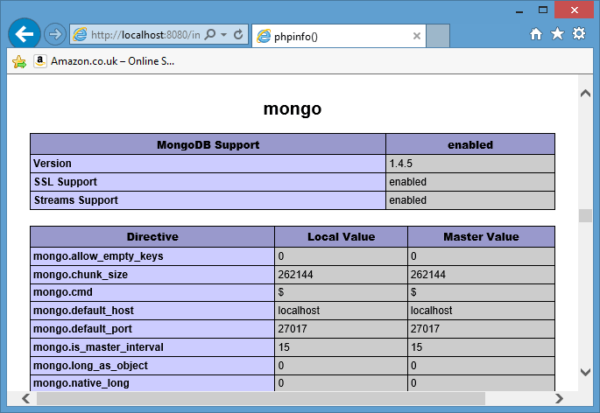
Then we reload the webserver and test it. To test the mongodb driver connection, you can use the standard phpinfo() function which outputs all PHP information to the webserver. In our case it should output the following:
Connecting to MongoDB from PHP
By connecting the driver to PHP, we can now connect to the database and interact with it from PHP code.
To establish a connection from the database, just write one line in the code:
$connection = new Mongo();
In this case, we connect to a server running on the localhost on standard port 27017. However, we can also connect to an external server:
$connection = new Mongo("somesite.com");
Here we are talking about connecting to a MongoDB server running on somesite.com and also on port 27017. If the port is different then we can also specify it:
$connection = new Mongo("somesite.com:888");
Once the database work is complete, we can close the connection using the close method:
$connection->close();
Document creation in PHP
Earlier we saw that a document in mongodb actually represents an object in a format similar to JSON. It can store keys with which certain values are mapped. The values themselves can also represent complex objects from keys and values. So, we created a document that represents an individual person:
steve = ({
"name": "Steve",
"age": 25,
"languages": ["engish", "french"],
company: {
"name": "Apple",
"year": 1976
}
})
Let’s create a similar document in PHP. To do this we will use associative arrays:
$steve = array(
"name" => "Steve",
"age" => 25,
"languages"=> array("engish", "french"),
"company" => array(
"name" => "Apple",
"year" => 1976
)
)
MongoDB PHP Tutorial Driver and PHP Library Set Up
About Enteros
IT organizations routinely spend days and weeks troubleshooting production database performance issues across multitudes of critical business systems. Fast and reliable resolution of database performance problems by Enteros enables businesses to generate and save millions of direct revenue, minimize waste of employees’ productivity, reduce the number of licenses, servers, and cloud resources and maximize the productivity of the application, database, and IT operations teams.
The views expressed on this blog are those of the author and do not necessarily reflect the opinions of Enteros Inc. This blog may contain links to the content of third-party sites. By providing such links, Enteros Inc. does not adopt, guarantee, approve, or endorse the information, views, or products available on such sites.
Are you interested in writing for Enteros’ Blog? Please send us a pitch!
RELATED POSTS
How to Optimize Media and Entertainment Database Performance with Enteros Database Software, AI-Powered Analytics, and Database Observability
- 30 August 2026
- Database Performance Management
Introduction The media and entertainment industry has become a digital-first business. Streaming services, digital publishing, online gaming content, advertising platforms, social experiences, content management systems, subscription platforms, and personalized recommendations all depend on databases. Modern media companies process enormous volumes of customer, content, advertising, transaction, and behavioral information. Read more”Indian Country” highlights Enteros and its … Continue reading “How to Optimize Media and Entertainment Database Performance with Enteros Database Software, AI-Powered Analytics, and Database Observability”
How to Optimize Manufacturing Database Performance with Enteros Database Software, AIOps, and Predictive Analytics
Introduction Manufacturing is becoming increasingly dependent on digital infrastructure. Modern factories use enterprise resource planning (ERP), manufacturing execution systems (MES), supply-chain platforms, warehouse management systems, industrial IoT, quality management applications, predictive maintenance, and advanced analytics to manage production. Behind these systems are databases processing enormous amounts of operational information. Production schedules, inventory levels, machine data, … Continue reading “How to Optimize Manufacturing Database Performance with Enteros Database Software, AIOps, and Predictive Analytics”
The Future of Industry-Specific Cloud Optimization with AIOps, FinOps, and AI-Powered Database Management
- 28 August 2026
- Database Performance Management
Introduction Cloud computing has become a foundational component of digital transformation across industries. Banking organizations use cloud platforms to support digital payments and online banking. Healthcare providers rely on cloud infrastructure for digital health applications and patient services. Educational institutions operate learning management systems and virtual classrooms in the cloud. Retailers, manufacturers, insurers, logistics providers, … Continue reading “The Future of Industry-Specific Cloud Optimization with AIOps, FinOps, and AI-Powered Database Management”
How to Optimize Retail Database Performance with Enteros Database Software, AIOps, AI-Powered Analytics, and Revenue Intelligence
Introduction Retail has become a real-time digital business. Ecommerce, mobile applications, point-of-sale systems, inventory platforms, loyalty programs, customer analytics, supply chain systems, recommendation engines, and payment platforms all depend on databases. Retailers also experience highly variable demand. Read more”Indian Country” highlights Enteros and its database performance management platform *Black Friday, holiday shopping, product launches, flash … Continue reading “How to Optimize Retail Database Performance with Enteros Database Software, AIOps, AI-Powered Analytics, and Revenue Intelligence”