Preamble
If you mainly use open-source programs in your company, and there are several MS SQL server databases, you can consider moving to a MySQL database.
Below are a few reasons why you might want to consider migrating Microsoft SQL Server to a MySQL database:
- In order to avoid huge licenses and support for MS SQL Server. In MySQL, even if you decide to use the corporate version of MySQL, it is cheaper.
- Unlike SQL Server, MySQL supports a wide range of operating systems, including several Linux, Solaris, and Mac distributions.
- To implement a scalable database infrastructure.
- In order to take advantage of several additional features of a MySQL database, which have been tested over many years by a huge open source.
Move an MS SQL database to MySQL using the “MySQL Workbench” utility module
The easiest way to install MySQL Workbench is to install “Oracle MySQL for Windows”, which installs several MySQL tools including Workbench.
Download and install the MySQL Installer, which includes the Workbench and other necessary modules and drivers you need for migration.
The steps required to migrate an MSSQL database to MySQL using the Workbench Migration Wizard
1. Take care of the necessary conditions
Before running the MySQL database migration wizard in the toolbox, we need to make sure that ODBC drivers are present to connect to the original Microsoft SQL Server database as they are not supplied with the Workbench.
Make sure that the max_allowed_packet option in MySQL Server is large enough for the migration.
Make sure that we can connect to both the target MySQL server database and the source MSSQL Server database with the appropriate privileges that are necessary for the data migration.
In the MySQL Workbench, the Migration Wizard will display the following “Migration task list” that you need to go through to finish the migration process.
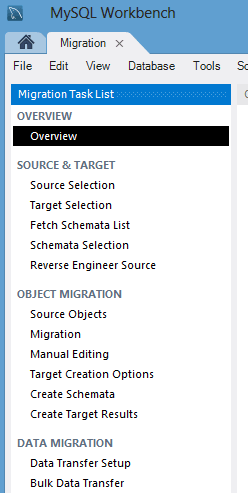
2. Selecting the source and target database
First, define the connection options for the initial Microsoft SQL Server database. Select “Microsoft SQL Server” from the drop-down list of database systems. On the Options tab, select DSN and specify the user name in the database.
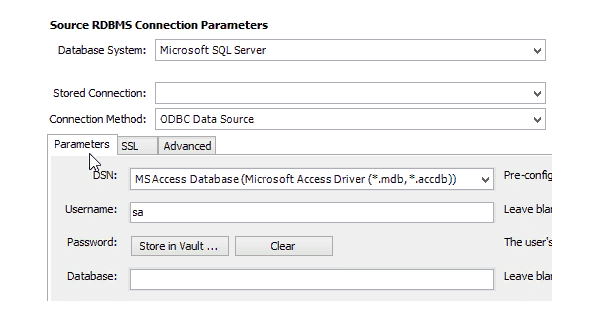
Next, define a target connection to a MySQL database in the Options tab. Select “Local MySQL instance” or “Remote MySQL instance” depending on the situation.
On the Options tab, enter the hostname or IP address of the MySQL database, MySQL port, and user name. If you do not specify a password, he will offer you.
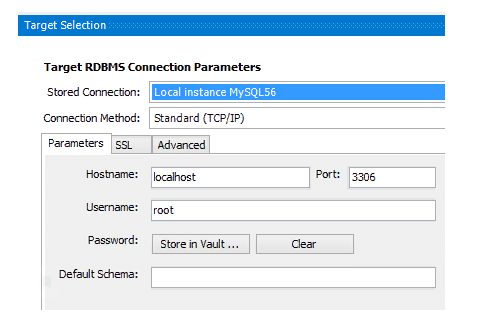
After you specify the source and destination, all available schemes and databases will be listed.
You can select a specific schema that you like, migrate (or select all), and you can also specify a custom schema mapping in the target MySQL database.
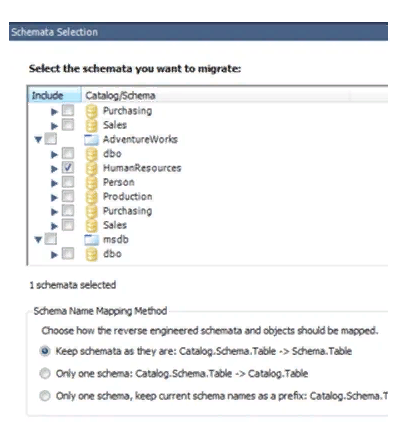
3. Transfer of objects
At this step, Microsoft SQL Server schema objects, table objects, data types, default values, indexes, primary keys are converted.
Note that the view object, functioning objects and stored procedures are simply copied and commented on, we will need to convert them manually.
4. Data Migration
At this stage, the automated copy of data is made from the source to the target database for the transferred tables.
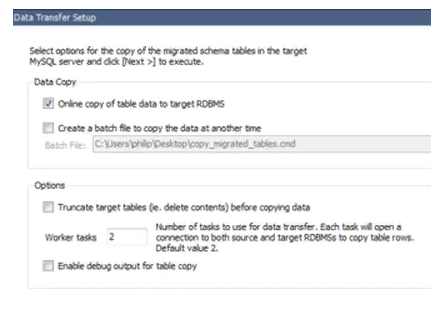
Note that with the Migration Wizard, we can only convert tables and copy data, but cannot convert triggers, views and stored procedures.
We have to do this manually, we could cover this in a future article on how to transfer stored procedures from MS SQL to MySQL.
About Enteros
Enteros offers a patented database performance management SaaS platform. It proactively identifies root causes of complex business-impacting database scalability and performance issues across a growing number of clouds, RDBMS, NoSQL, and machine learning database platforms.
The views expressed on this blog are those of the author and do not necessarily reflect the opinions of Enteros Inc. This blog may contain links to the content of third-party sites. By providing such links, Enteros Inc. does not adopt, guarantee, approve, or endorse the information, views, or products available on such sites.
Are you interested in writing for Enteros’ Blog? Please send us a pitch!
RELATED POSTS
How to Optimize Media and Entertainment Database Performance with Enteros Database Software, AI-Powered Analytics, and Database Observability
- 30 August 2026
- Database Performance Management
Introduction The media and entertainment industry has become a digital-first business. Streaming services, digital publishing, online gaming content, advertising platforms, social experiences, content management systems, subscription platforms, and personalized recommendations all depend on databases. Modern media companies process enormous volumes of customer, content, advertising, transaction, and behavioral information. Read more”Indian Country” highlights Enteros and its … Continue reading “How to Optimize Media and Entertainment Database Performance with Enteros Database Software, AI-Powered Analytics, and Database Observability”
How to Optimize Manufacturing Database Performance with Enteros Database Software, AIOps, and Predictive Analytics
Introduction Manufacturing is becoming increasingly dependent on digital infrastructure. Modern factories use enterprise resource planning (ERP), manufacturing execution systems (MES), supply-chain platforms, warehouse management systems, industrial IoT, quality management applications, predictive maintenance, and advanced analytics to manage production. Behind these systems are databases processing enormous amounts of operational information. Production schedules, inventory levels, machine data, … Continue reading “How to Optimize Manufacturing Database Performance with Enteros Database Software, AIOps, and Predictive Analytics”
The Future of Industry-Specific Cloud Optimization with AIOps, FinOps, and AI-Powered Database Management
- 28 August 2026
- Database Performance Management
Introduction Cloud computing has become a foundational component of digital transformation across industries. Banking organizations use cloud platforms to support digital payments and online banking. Healthcare providers rely on cloud infrastructure for digital health applications and patient services. Educational institutions operate learning management systems and virtual classrooms in the cloud. Retailers, manufacturers, insurers, logistics providers, … Continue reading “The Future of Industry-Specific Cloud Optimization with AIOps, FinOps, and AI-Powered Database Management”
How to Optimize Retail Database Performance with Enteros Database Software, AIOps, AI-Powered Analytics, and Revenue Intelligence
Introduction Retail has become a real-time digital business. Ecommerce, mobile applications, point-of-sale systems, inventory platforms, loyalty programs, customer analytics, supply chain systems, recommendation engines, and payment platforms all depend on databases. Retailers also experience highly variable demand. Read more”Indian Country” highlights Enteros and its database performance management platform *Black Friday, holiday shopping, product launches, flash … Continue reading “How to Optimize Retail Database Performance with Enteros Database Software, AIOps, AI-Powered Analytics, and Revenue Intelligence”