Preamble
In Windows, when the operating system crashes, an emergency memory dump is automatically created and saved in the Windows system directory in the MEMORY.DMP file (%SystemRoot%\MEMORY.DMP).
This file helps to determine the cause of operating system failure and determine the process that may have caused the OS to shut down. The memory dump file can be several gigabytes in size, so special tools are required to analyze it.
The steps to be taken to analyze the MEMORY.DMP emergency memory dump file
To read the MEMORY.DMP file, you will need a special utility: Debugging Tools for Windows (WinDbg), which is part of Windows 10 SDK, you can download it here: Windows 10 SDK, both as an installer and as an ISO file.
The SDK (software development kit) is a development kit that allows software professionals to create applications for a specific software package, software basic development tools, hardware platform, computer system, game consoles, operating systems and other platforms.
Installing Debugging Tools for Windows from the Software Development Kit (SDK)
1. Run the installation file on the computer where the MEMORY.DMP emergency memory dump analysis will be performed.
2. Select the installation path and press Next 2 times.
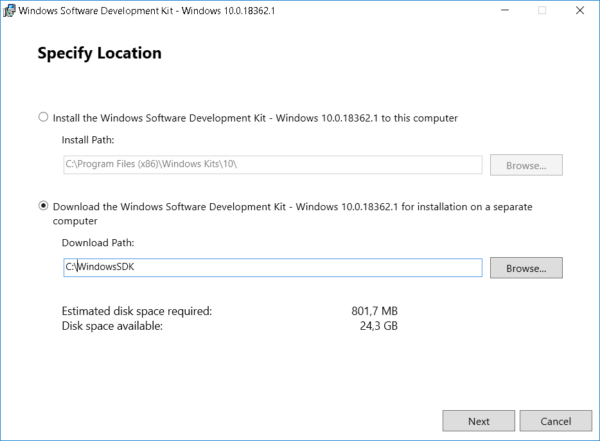
3. Adopt license agreement
4. Select Debugging Tools for Windows in the window of selecting a set of utilities to be installed (you won’t need any other items to analyze the memory dump) and press Install
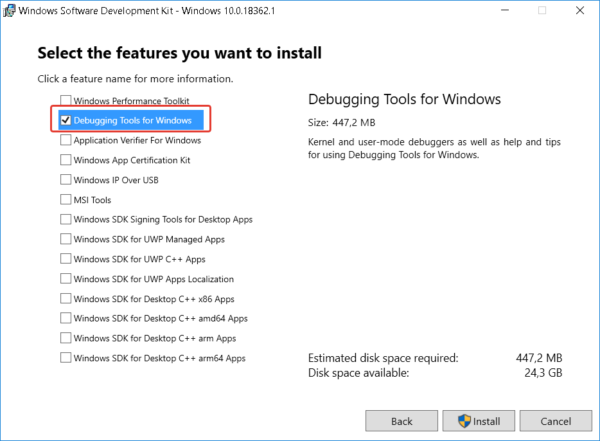
5. When the installation is complete, press Close
The Debugging Tools for Windows utility is installed.
MEMORY.DMP emergency memory dump analysis
1. Run the installed WinDbg utility and select Open Crash Dump in the File menu.
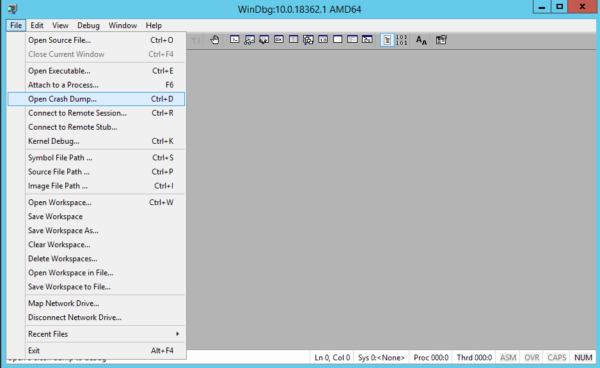
2. In the file opening window, go to the MEMORY.DMP file path and open it
3. After studying the headlines, click on the link: !analyze -v or enter this command manually
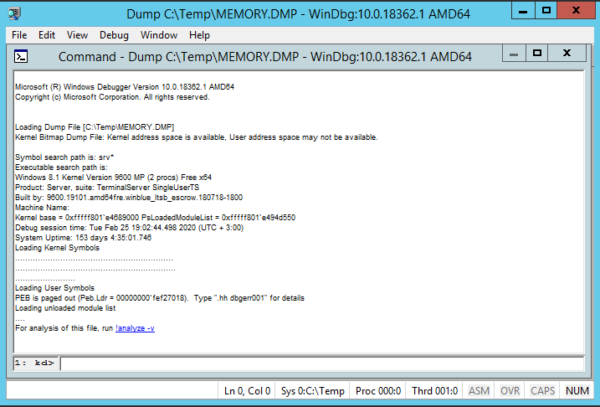
4. Waiting for some time for the utility to read the file and search for errors
5. Analyzing information about the process that caused Windows to crash
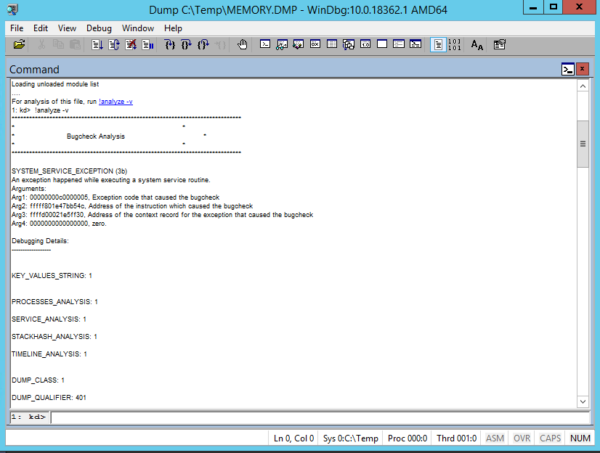
Using this information, you can understand which process caused the OS crash.
If the specified process belongs to the software manufacturer, you can refer to it with the corresponding case.
About Enteros
Enteros offers a patented database performance management SaaS platform. It proactively identifies root causes of complex business-impacting database scalability and performance issues across a growing number of clouds, RDBMS, NoSQL, and machine learning database platforms.
The views expressed on this blog are those of the author and do not necessarily reflect the opinions of Enteros Inc. This blog may contain links to the content of third-party sites. By providing such links, Enteros Inc. does not adopt, guarantee, approve, or endorse the information, views, or products available on such sites.
Are you interested in writing for Enteros’ Blog? Please send us a pitch!
RELATED POSTS
How Can Banks Prevent Database Bottlenecks in Real-Time Financial Transactions?
- 1 September 2026
- Database Performance Management
Banks can prevent database bottlenecks in banking by continuously monitoring SQL workloads, optimizing queries and indexes, detecting resource contention, analyzing transaction latency, and identifying anomalies before performance declines. Effective database performance monitoring for banks provides real-time workload visibility and faster root cause analysis. Enteros helps financial institutions identify database inefficiencies and maintain reliable, scalable transaction … Continue reading “How Can Banks Prevent Database Bottlenecks in Real-Time Financial Transactions?”
Why Is Database Observability Important for Modern Hospitals and Healthcare IT Teams?
Database observability in healthcare is important because hospitals depend on databases to power EHRs, patient portals, clinical applications, billing, analytics, and other essential systems. It gives healthcare IT teams deeper visibility into SQL workloads, resource usage, bottlenecks, and performance changes. Enteros supports this approach with database observability, AI-powered analysis, anomaly detection, and root cause analysis … Continue reading “Why Is Database Observability Important for Modern Hospitals and Healthcare IT Teams?”
How Can Healthcare Organizations Reduce Cloud Database Costs With AIOps and FinOps
Healthcare organizations can reduce cloud database costs by combining AIOps with FinOps to identify inefficient workloads, detect anomalies, rightsize resources, and connect database performance with infrastructure spending. Effective healthcare cloud database cost optimization focuses on eliminating waste without compromising reliability. Enteros supports this approach through database observability, AI-powered SQL analysis, root cause analysis, performance intelligence, … Continue reading “How Can Healthcare Organizations Reduce Cloud Database Costs With AIOps and FinOps”
What Database Performance Challenges Do Hospitals Face in Cloud-Based Healthcare Systems?
Hospitals face database performance challenges such as slow SQL queries, growing healthcare data, EHR performance issues, database bottlenecks, resource contention, cloud complexity, and rising costs. Cloud-based healthcare systems require continuous database monitoring, workload optimization, anomaly detection, and root-cause analysis. AI-powered AIOps can help hospitals improve database performance, reliability, scalability, and cloud cost efficiency while supporting … Continue reading “What Database Performance Challenges Do Hospitals Face in Cloud-Based Healthcare Systems?”